Jump to
Managing your Account
You can manage your subscription and account from your Profile page. To get there, sign in and go to your Profile by tapping on the Gear ⚙️ icon in the lower left of the sidebar. It will show either your first name, like this:
or the word Profile, like this:
How do I cancel my renewal?
Your Standard Plan is a yearly subscription that renews automatically. You can turn off automatic renewal at any time, and you’ll keep access to the Standard Plan until the end of your current billing period.
- Sign in and go to your Profile.
- In the Your Plan section, find your Standard Plan and click Manage/cancel subscription:
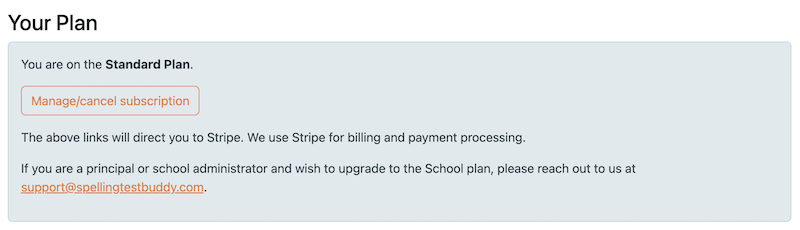
- This takes you to the Stripe customer portal, where we handle billing and payments. From there you can cancel your subscription to stop the renewal, or update your payment details.
Once you cancel, you won’t be charged again, and your paid features will stop when your current subscription period ends.
Note: Because we offer a free trial before you purchase, we do not offer refunds on the Standard Plan.
On the School plan? School plans are paid for and managed by your school administrator. If you’d like to cancel a School subscription, please email us at support@spellingtestbuddy.com.
How do I add a co-teacher?
A co-teacher is a colleague who can help run your classroom from their own login: a long-term substitute, a classroom aide, an interventionist, or a student teacher. You never have to share your password.
Co-teachers are available on the Standard and School plans. Your co-teacher also needs their own Spelling Test Buddy account on a Standard or School plan.
To add a co-teacher:
- Sign in and go to your Profile.
- Scroll down to the Co-teacher section.
- Enter your colleague’s email address. Use the same email they use to log in to Spelling Test Buddy.
- Click Save co-teacher.
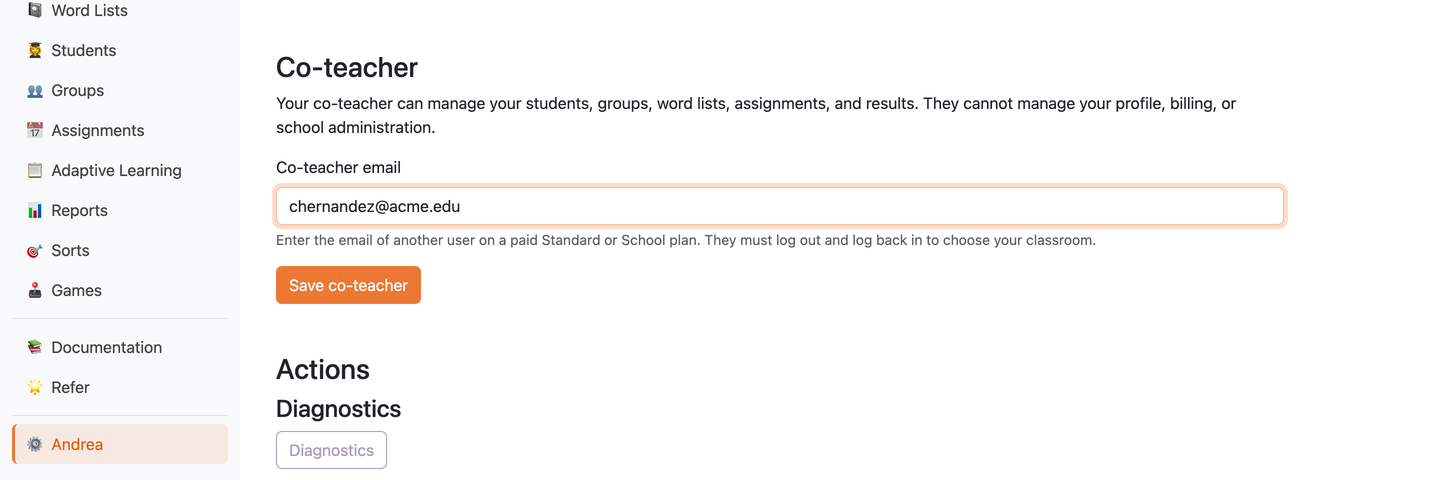
You’ll see a confirmation that your co-teacher was saved. They’ll be able to choose your classroom the next time they log in.
You can have one co-teacher at a time.
What a co-teacher can and cannot do
Your co-teacher can:
- Add and manage your Students and Groups
- Create and edit your Word Lists and Folders
- Create and change Assignments, including Adaptive Learning programs, Sorts, and Games
- View your students’ test results and reports
Your co-teacher cannot:
- See or change your Profile (name, email, and settings)
- See or change your billing or plan
- Manage your school administration
- Share your Word Lists or Folders with other teachers
Anything your co-teacher creates or changes is saved in your classroom, so it stays there after they’re gone. Your students keep using the same Classroom Link and Student Codes.
For the co-teacher: working in another teacher’s classroom
If a teacher has added you as their co-teacher:
- Log out of Spelling Test Buddy, then log back in with your own account.
- You’ll see a page asking Which account would you like to use?
- Choose Co-teach on [teacher’s name]’s account to work in their classroom, or Use my own account to work with your own students and Word Lists.
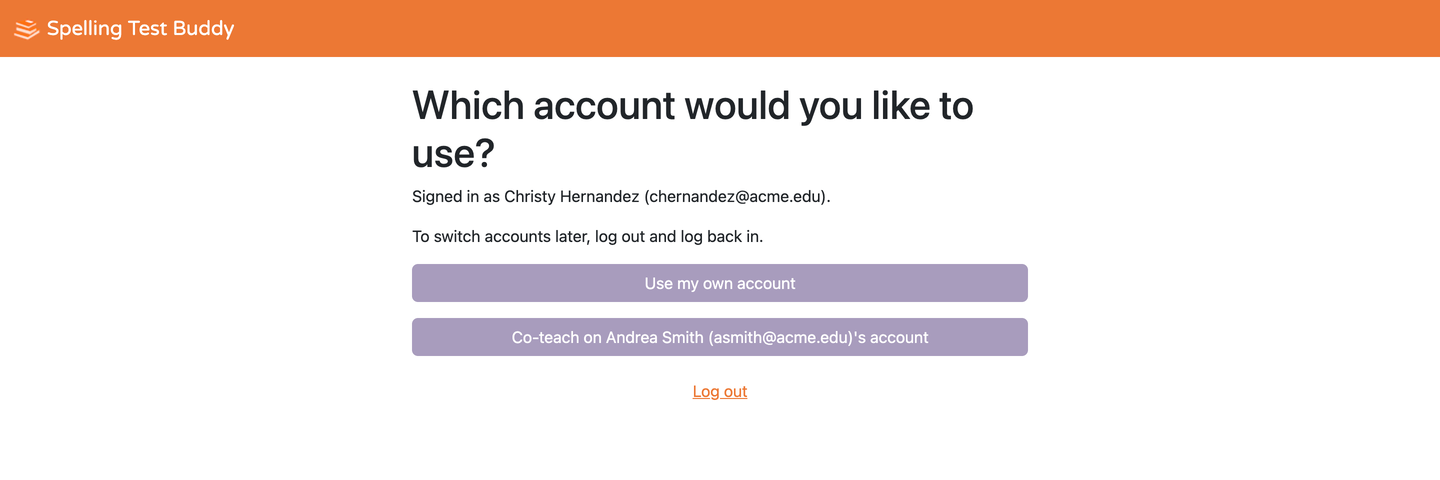
While you’re co-teaching, a banner at the top of every page shows whose classroom you’re in:
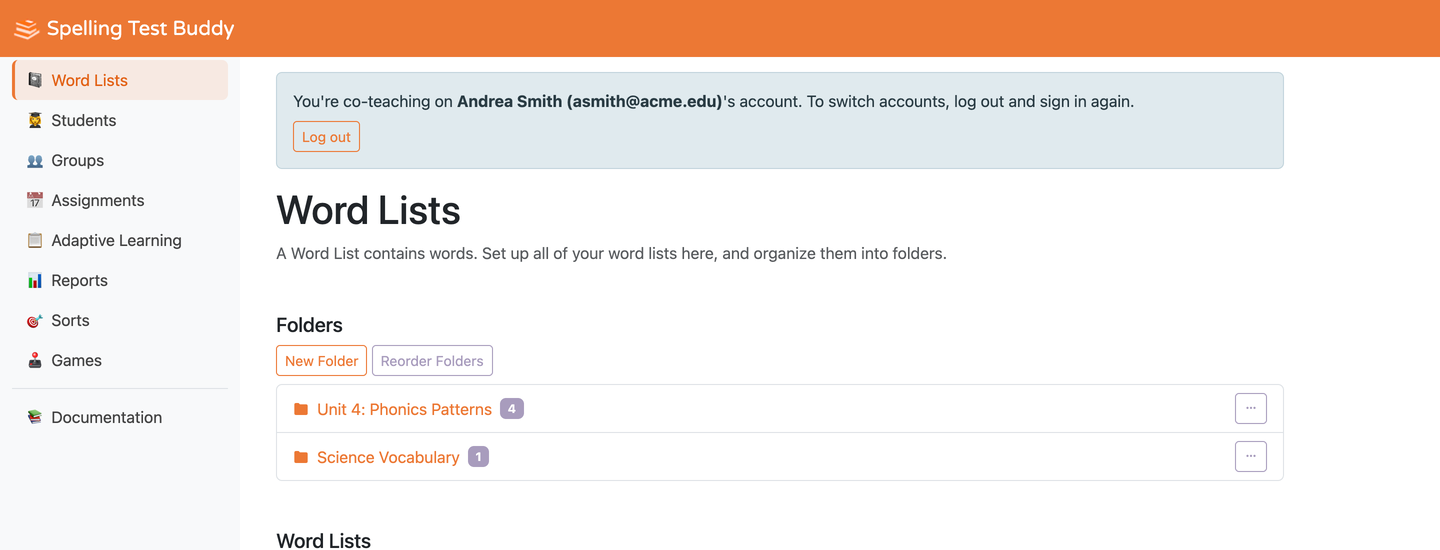
To switch between classrooms, or to get to your own Profile, log out and log back in, then choose the other account.
If more than one teacher has added you as their co-teacher, each of their classrooms will be listed on that page.
Changing or removing your co-teacher
- To change your co-teacher, enter a different email address in the Co-teacher section of your Profile and click Save co-teacher.
- To remove your co-teacher, click Remove co-teacher in the same section.
Access ends right away. If your former co-teacher is working in your classroom at that moment, they’ll be logged out on their next click.
Co-teacher access also pauses if either your account or your co-teacher’s account is no longer on a paid Standard or School plan.
Co-teacher troubleshooting
I see “Enter the email address of another existing user on a paid Standard or School plan.” Check that the email matches the one your colleague uses to log in, and that their account is on a Standard or School plan. You can’t add yourself as your own co-teacher.
My co-teacher doesn’t see the option to co-teach. They need to log out and log back in after you save them. Also check that both of your accounts are on a paid Standard or School plan.
The Co-teacher section is grayed out on my Profile. Co-teachers are only available on the Standard and School plans. See pricing, or reply to any of our emails and we’ll help you upgrade.
How do I delete my account?
If you no longer want a Spelling Test Buddy account, you can permanently delete it from your Profile page.
Warning: Deleting your account cannot be undone. It permanently removes:
- Your account and login information
- All of your Word Lists and Folders
- All of your Students and their test results
- All of your Groups and Assignments
- All of your account data and settings
- Your subscription to our email list
To delete your account:
- Sign in and go to your Profile.
- Scroll down to the Actions section.
- Under Delete Account, click Click to expand to see the details.
- Click Delete My Account and confirm when prompted.
If you’d like to cancel your renewal but keep your account and data, see How do I cancel my renewal? above instead.