How to Give and Automatically Grade an Online Spelling Test
A traditional spelling test requires the teacher to read every word and sentence, control the pace, collect the papers, mark each response, calculate scores, and record the results. That process becomes even harder when students use different lists or need to test at different times.
An online spelling test moves repetitive administration and scoring into the assignment. Teachers still choose the words and teach the spelling concept. Students hear the words, complete the test independently, and receive feedback when they submit it.
What students experience
Each test includes audio for the target word and an example sentence. Students listen, type the spelling, and move through the list.
Try a sample test below:
Depending on the settings selected by the teacher, students can repeat the word or sentence audio. This supports independent pacing and removes the need for the entire class to wait for the next word.
How to create the test
1. Create or import a word list
Enter your own words, paste a list, choose from a pre-made list, or upload an existing Word, Excel, PDF, or image file.
Spelling Test Buddy creates word audio and an example sentence automatically. Review each entry and adjust a sentence or pronunciation when necessary.
2. Make the list a digital test
When customizing the word list, enable Make this a digital test.

3. Assign or share it
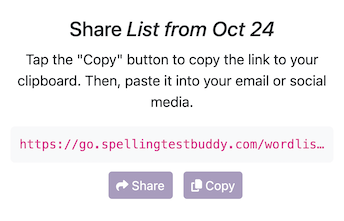
Teachers can assign the test to students or groups. A standalone digital test can also be shared with a link or embedded in another website.
For a complete explanation of classroom assignments, see Assigning Tests and Sending Them to Students.
Automatic grading and immediate feedback
When a student submits the test, Spelling Test Buddy compares each response with the word list and calculates the result automatically.
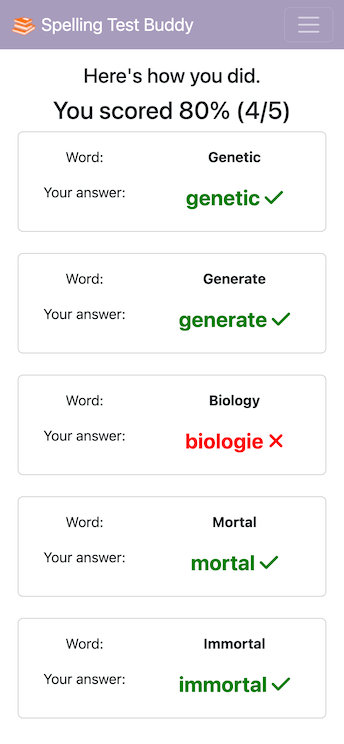
Students receive feedback immediately. Teachers do not have to collect papers, mark each word, total the points, or calculate a percentage.
Automatic grading is especially useful when:
- Several spelling groups use different lists.
- Students test at different times.
- The teacher wants to preserve small-group instructional time.
- Practice tests are given during the week.
- An absent student needs to complete a make-up test.
Review every missed word
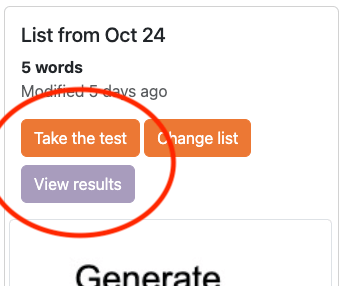
Automatic grading should not hide the information teachers need. Open View Results to see who completed the test and the score earned.
Expand the details to inspect the student’s responses and missed words.
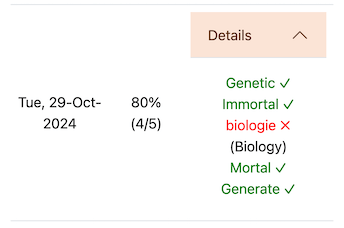
This helps distinguish between an isolated mistake and a repeated problem with a spelling pattern. The teacher can then reteach the relevant concept rather than spending time grading words the student already knows.
Use the same list for practice and the final test
The test should not be an isolated artifact. The saved word list can also power:
- Teach Me instruction.
- Digital practice tests.
- Spelling games.
- Printable spelling and phonics worksheets.
- Adaptive review.
For a repeatable classroom plan, see How to Create a Week of Spelling Activities in Minutes.
Give different groups different tests
Teachers can assign different word lists to groups without personally reading each test. This supports phonics groups, Words Their Way groups, intervention, ESL instruction, and challenge lists.
Students receive the audio and sentences attached to their own assignment. The results remain connected to the correct student and list.
Handle make-up tests independently
If a student is absent, keep the original assignment available and let the student complete it after returning. The teacher does not need to recreate the assessment or stop instruction to call out the words.
See How to Give Make-Up Spelling Tests Without Interrupting Class for a complete procedure.
Export or print the results
Teachers can review results online, produce printable reports, or create a CSV for gradebook entry. Read How to Grade Spelling Tests Faster and Export the Results for the reporting workflow.
What an online spelling test should not replace
Digital delivery saves time, but it does not replace explicit spelling instruction. Teachers should still:
- Introduce and explain the spelling pattern.
- Model how sounds, syllables, and morphemes connect to spelling.
- Review unexpected errors.
- Provide required accommodations.
- Use results to plan reteaching and future practice.
The platform handles repeated word delivery, scoring, and recordkeeping so teachers can spend more time on those higher-value decisions.
For the complete workload-saving framework, read How to Save Time Teaching Spelling.
Ready to get started?
Try Spelling Test Buddy today, for free!
Start Creating Tests, Practice, and Games