How to Grade Spelling Tests Faster and Export the Results
The work of a spelling test does not end when students put down their pencils. Teachers still have to mark each word, calculate the score, identify errors, enter grades, and sometimes prepare a copy to send home.
An online spelling-test workflow can handle the repetitive parts automatically while preserving the word-level detail teachers need for instruction.
1. Let the test grade each response
When students submit an online spelling test, Spelling Test Buddy scores the answers automatically. Students receive immediate feedback, and the result is saved to the teacher’s account.
This removes several manual steps:
- Collecting and sorting papers.
- Checking every response against an answer key.
- Counting correct answers.
- Calculating percentages.
- Deciphering unclear handwriting when the goal is spelling knowledge.
Teachers can spend their review time on unusual mistakes, patterns of error, and students who need follow-up.
2. Inspect the words students missed
A percentage alone is not enough for instructional planning. Open the Reports area to see the student’s score and detailed responses.
Use the word-level results to ask:
- Did the student miss several words containing the same pattern?
- Is the difficulty with a sound-spelling relationship, syllable type, or affix?
- Did many students miss the same word?
- Does the word need better explanation or a corrected example sentence?
- Should the word return in future practice?
Spelling Test Buddy also summarizes commonly missed words, helping teachers choose what to reteach without reviewing every paper by hand.
3. Create a printable PDF report
Teachers often need a physical record for students, families, conferences, or classroom files.
Go to the Reports tab. In Create a printable PDF or CSV of all test results, choose the word list, test date, and assignment type.
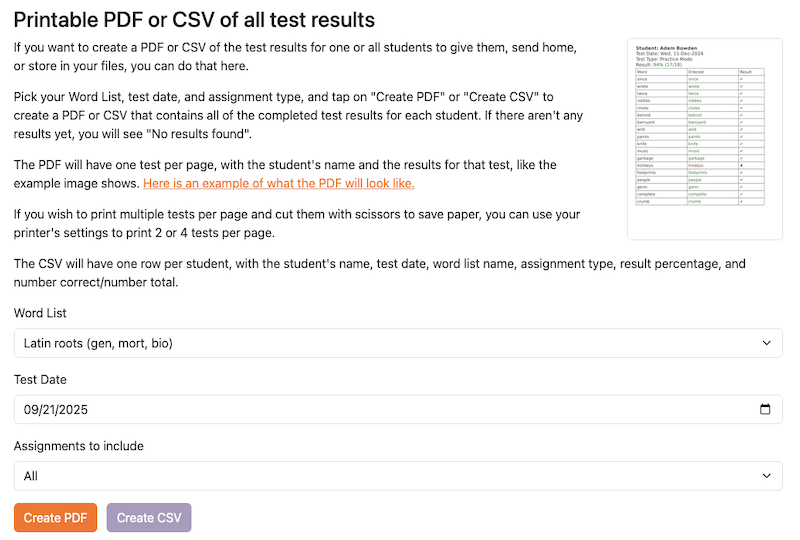
Select Create PDF to generate the completed results. Each report includes the student name and test details.
Possible uses include:
- Sending test results home.
- Preparing documentation for parent-teacher conferences.
- Keeping an assessment sample in a student portfolio.
- Sharing results with an interventionist or support teacher under school policy.
If you want to conserve paper, use your printer settings to place multiple PDF pages on one sheet.
4. Export results as a CSV
Select Create CSV to download structured test data. The export includes:
Last name, First name, Test Date, Word List, Assignment type,
Result percentage, Number correct, Number total
A CSV can reduce duplicate entry when your gradebook or learning-management system supports spreadsheet imports. Always review the file and follow your school’s approved process for handling student information.
5. Use reports to plan the next instruction
The final goal is not merely to store a grade. Use the result to decide what happens next:
- Reteach a pattern missed by much of the class.
- Create a targeted list for a small group.
- Keep difficult words in an Adaptive Learning Program.
- Move students who demonstrate mastery to the next skill.
- Send home a focused practice list rather than the entire test again.
This turns grading data into an instructional shortcut: the report identifies where teacher attention will have the greatest value.
A faster end-to-end assessment workflow
- Create or reuse the word list.
- Assign an audio-supported digital test.
- Students complete and submit it independently.
- Scores and missed words are recorded automatically.
- Review only the results that require instructional attention.
- Export a CSV or print reports when needed.
- Carry difficult words into future practice.
Students who were absent can complete the same test later using the make-up spelling-test procedure, so their results enter the same reporting workflow.
Keep student information protected
Downloaded reports and CSV files contain student information. Store, transmit, and delete them according to your school or district’s privacy policies. Learn more about student data privacy in Spelling Test Buddy.
Save the teacher’s attention for the errors that matter
Automatic scoring is most valuable when it changes what the teacher has to examine. Instead of marking every correct word, the teacher can focus on persistent misconceptions, commonly missed patterns, and students who need direct support.
For the broader workflow covering preparation, practice, testing, grading, and reuse, read How to Save Time Teaching Spelling.
Ready to get started?
Try Spelling Test Buddy today, for free!
Start Creating Tests, Practice, and Games